What is OMMX?#
OMMX (Open Mathematical prograMming eXchange) is an open project that aims to make preprocessing and problem-transformation techniques reusable through a common representation of mathematical optimization problems. Placing that representation between modeling tools and solvers lets different solving methods use the same transformation and evaluation machinery.
For example, developing a new solving method becomes harder if you must also reimplement problem conversion and candidate checking. Defining what a problem and a candidate mean independently of a solver lets those tasks be shared. OMMX provides a data format, Python and Rust SDKs for construction, evaluation, transformation, and storage, and adapters that connect to solvers.
Why use OMMX today?#
The current v3 development line supports the following tasks on a common problem representation. Its examples require a v3 preview of the SDK and, when needed, matching adapter packages. Use the versioned installation guide (Japanese). Unversioned installation commands in older tutorials select the stable v2 series. This Book and the v3 release notes also describe development features that may not yet be in a published package; check the selected release’s availability before using them.
Your goal |
What OMMX can handle |
What you decide |
|---|---|---|
Try another solver or solving method |
Supported special-constraint conversions and integer encodings; exchange with backends through adapters |
The method, permitted transformations, and solver settings |
Check whether a candidate is usable |
Evaluate variable domains, constraints, and the objective; reconstruct original variable values from information retained by supported transformations |
How to model the requirements of your application and whether to accept the candidate |
Pass problems and results to another process |
Read and write a common format; save and share Artifacts; record settings and results in Experiments |
What to record and what to compare |
You can use only the parts you need. Evaluating a candidate from your own algorithm with the SDK requires neither an adapter nor an Artifact. Modeling turns application requirements into variables, objectives, and constraints; OMMX supplies common processing of that problem; a solver or sampler searches for candidates.
Evaluate a candidate you already have#
Variable values alone do not tell you what an optimization result means. You also need the variables’ domains, the constraints they must satisfy, and the objective used for comparison. For example, you can describe a problem in which two items cannot both be selected and check a candidate:
from ommx import Instance

instance = Instance.maximize()
x = instance.new_binary("x")
y = instance.new_binary("y")
instance.objective = x + y
instance.add_constraint(x * y == 0)

solution = instance.evaluate({x.id: 1, y.id: 0})
assert solution.feasible
assert solution.objective == 1
This candidate satisfies the constraint and has objective value 1. You can check candidates against the same problem whether they come from your own algorithm, a solver, or a person. Evaluating whether a candidate is feasible and searching for a better candidate are different operations. Evaluation alone does not establish optimality.
Separate a problem’s meaning from its representation for solving#
Solvers differ in which objectives and constraints they can handle directly. OMMX lets you change a problem’s representation when needed instead of committing to one solver’s representation at the outset.
For example, the requirement to select exactly one of three binary variables can be represented as a OneHot special constraint. If ordinary linear constraints are needed, it can be converted to x[0] + x[1] + x[2] == 1. Keeping the explicit “select exactly one” structure makes its meaning available to later analysis and transformations. In v3, special constraints are objects that can be constructed, evaluated, and transformed, just like regular constraints.
Which structures can remain explicit depends on the solving method. For supported models, the PySCIPOpt Adapter passes Indicator and SOS1 constraints to SCIP. When their conversion conditions, including variable-domain and bound requirements, are met, they can instead be lowered to regular constraints for a backend such as HiGHS, provided the resulting problem meets that adapter’s input requirements. Your transformation policy determines which conversions are permitted.
What a transformation preserves depends on the operation. Some express the same condition in another form; others change the conditions imposed or the objective being compared. Feasibility, objective values, and optimality before and after a transformation are distinct guarantees. The constraint-lowering guide explains supported conversions and their retained history; individual operations’ conditions and guarantees belong to the API Reference.
Accumulate transformation techniques on a common representation#
Implementing preprocessing and transformations against a common representation lets modeling tools and solving methods reuse them. A new method can connect its inputs and outputs to that representation and benefit from the techniques already available. This is why OMMX develops both data exchange and shared processing of that data.
Today, OMMX supplies specific operations and policies for selecting supported transformations and evaluating candidates. For example, it can tighten variable bounds using constraints, but this operation performs one update; it does not automatically optimize an entire preprocessing workflow.
The development direction is to combine these techniques and select or repeat them according to a problem’s structure. Accumulating both individual techniques and the knowledge of when to apply them should let the shared foundation take on more of the preparation that people perform manually today.
Start with your purpose#
Your task |
Start here |
What you will learn |
|---|---|---|
Solve a problem with a solver |
Create an Instance, solve it, and read the result |
|
Evaluate a candidate you already have |
Evaluate variable values against a problem and read objective and feasibility results |
|
Understand the problem representation |
Describe variables, objectives, and constraints |
|
Use special constraints |
Understand Indicator, OneHot, and SOS1 constraints and their solver integration |
|
Convert constraints for a different backend |
Distinguish input requirements from conversion and inspect conversion history |
|
Tighten variable bounds from constraints |
Perform one update and inspect the changed bounds |
|
Compare multiple candidates |
Read sample evaluations and select among the candidates obtained |
|
Sample a QUBO with OpenJij |
Follow a QUBO sampling application and inspect its results |
|
Obtain existing problems |
Download a problem as an OMMX Instance |
|
Record and compare experiments |
Associate settings with results |
|
Save and share problems and results |
Package data together with metadata |
|
Connect your own solving tool |
Translate backend inputs and outputs through the common adapter interface |
This Book explains what OMMX can do, why and when to use it, what to choose, and how to interpret results. Use small examples to understand the meaning, then consult the API Reference for detailed calls, arguments, preconditions, and guarantees. You do not need to read every page in order.
If you already have a problem and candidate values, you can begin with candidate evaluation. Running an adapter tutorial is not a prerequisite.
Use or implement an Adapter#
After the versioned setup above, start with the small knapsack model in Solve with an OMMX Adapter. The supported adapters page lists the available integrations. Continue to Special Constraints for constraints that a backend can handle directly, or Explicit Constraint Lowering for conversions and their conditions.
To compare solvers, use Solve with multiple adapters and compare the results. To try sampling, use the OpenJij TSP example. Each has its own model; you do not need the runtime state of a previous tutorial.
If you are connecting your own solving tool, the adapter implementation guide explains how to translate its input and output through OMMX’s common interface.
Support data exchange and sharing#
Giving problems and results common meanings helps both software and people work with the same data. OMMX supports these handoffs through the following components:
Component |
Role |
|---|---|
OMMX Message |
A language- and OS-independent data format for problems and results |
OMMX SDK |
Construction, evaluation, transformation, reading, and writing of problems and results |
OMMX Adapter |
Connection between OMMX and a solver’s inputs and outputs |
OMMX Artifact |
A package for saving and sharing problems, results, and attachments with metadata |
Message schemas are defined with Protocol Buffers, with SDKs provided for Python and Rust. In Python user code, use the public API, such as from ommx import Instance. The schema sources define the wire formats; a generated v1 Message Schema is also available.
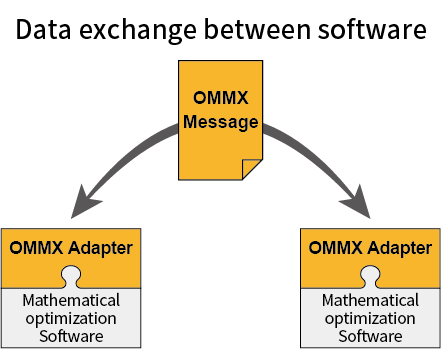
Connect software through a common representation of problems and results.#
Alongside problems and results, Artifacts can record what was solved and with which settings. They use OCI standards, so they can also be distributed through existing registries such as GitHub Container Registry. OMMX uses this mechanism to publish MIPLIB and QPLIB problems. The Artifact format specification defines manifests, layers, and media types for tools that need to read or write the format directly.